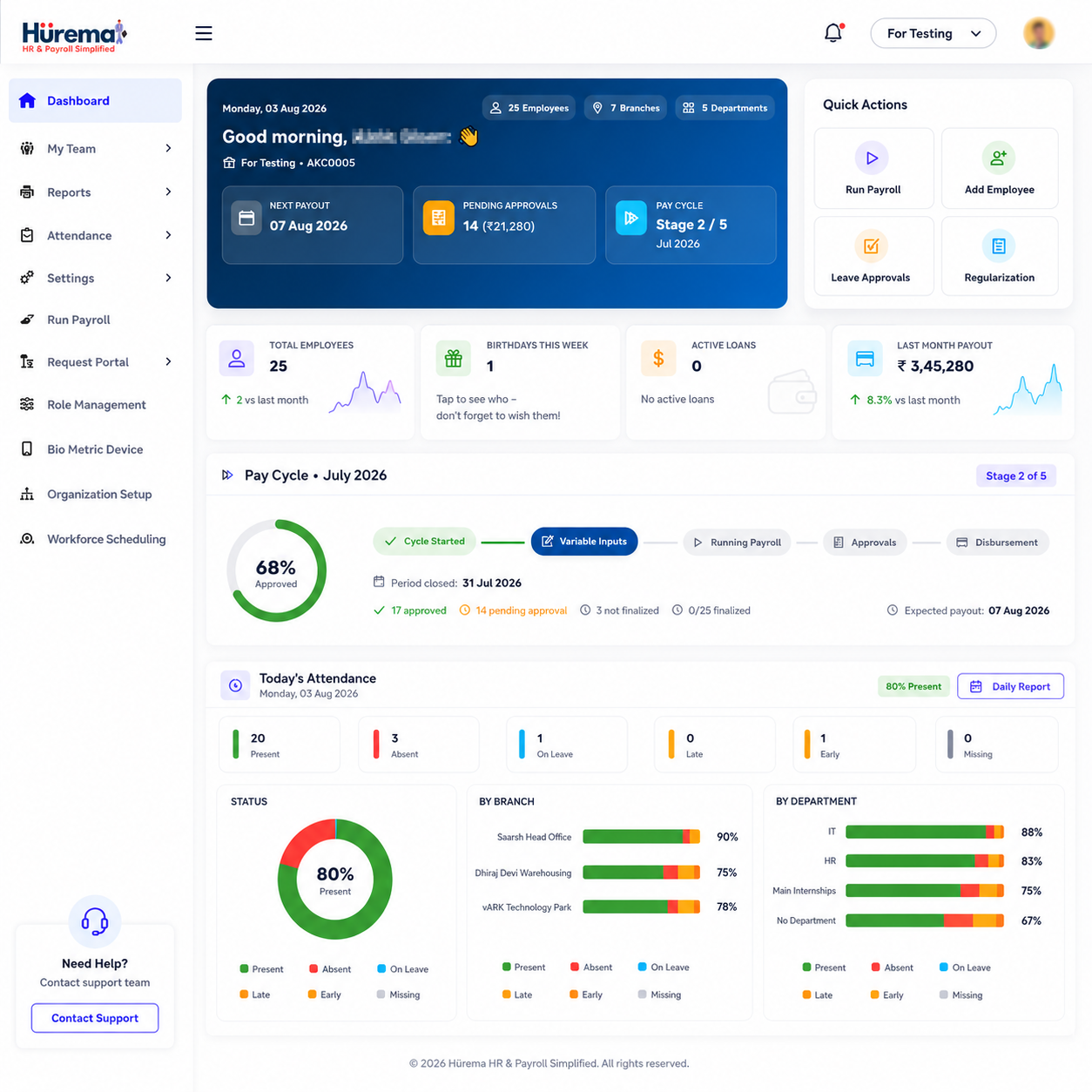
Payday may be one date on the calendar, but payroll management involves a chain of work beforehand: maintaining employee and compensation details, collecting approved inputs, calculating pay, reviewing deductions, paying employees and keeping records. A repeatable process helps avoid last-minute reconciliation and gives employees a clearer account of their pay.
What is payroll?
Payroll is the process an employer uses to calculate and distribute compensation to employees for a defined period. Depending on the organisation and applicable rules, the process may include fixed salary, variable earnings, adjustments, deductions, payment records and a payslip. Payroll management is the coordinated administration of those tasks and the supporting records.
A payroll management system can be a structured manual process, dedicated payroll software or payroll functionality within an HRMS. Software can help apply configured rules consistently, keep a record of inputs and generate pay documents. The employer remains responsible for accurate data, approval and confirming current legal requirements.
How does payroll work?
Although pay structures differ, a typical payroll cycle follows several stages:
- Maintain employee and pay information. Keep approved salary terms, role, employment status, payment details and relevant changes current.
- Gather period inputs. Review attendance, approved leave, overtime or variable pay where applicable, and authorised changes or adjustments.
- Calculate gross and net pay. Apply the employee's compensation structure and relevant additions and deductions.
- Review exceptions. Investigate missing records, unusual amounts, joining or exit dates and changes since the previous cycle.
- Approve and pay. Follow the organisation's authorisation process and arrange payment through the chosen banking or payment workflow.
- Issue payslips and keep records. Provide employees with a clear pay statement and retain supporting records according to policy and law.
Separating data preparation from final approval is a useful control. An automated calculation can still be wrong if a salary change was never approved or a time record is incomplete. Human review is part of responsible payroll processing.
Salary calculation: from pay structure to take-home pay
Salary calculation begins with the agreed compensation structure for each employee. Organisations may manage fixed monthly salary, daily wages or hourly pay; the calculation method and relevant inputs depend on that arrangement and the employer's rules. Payroll teams should document how each pay component is treated rather than applying one formula to every person by assumption.
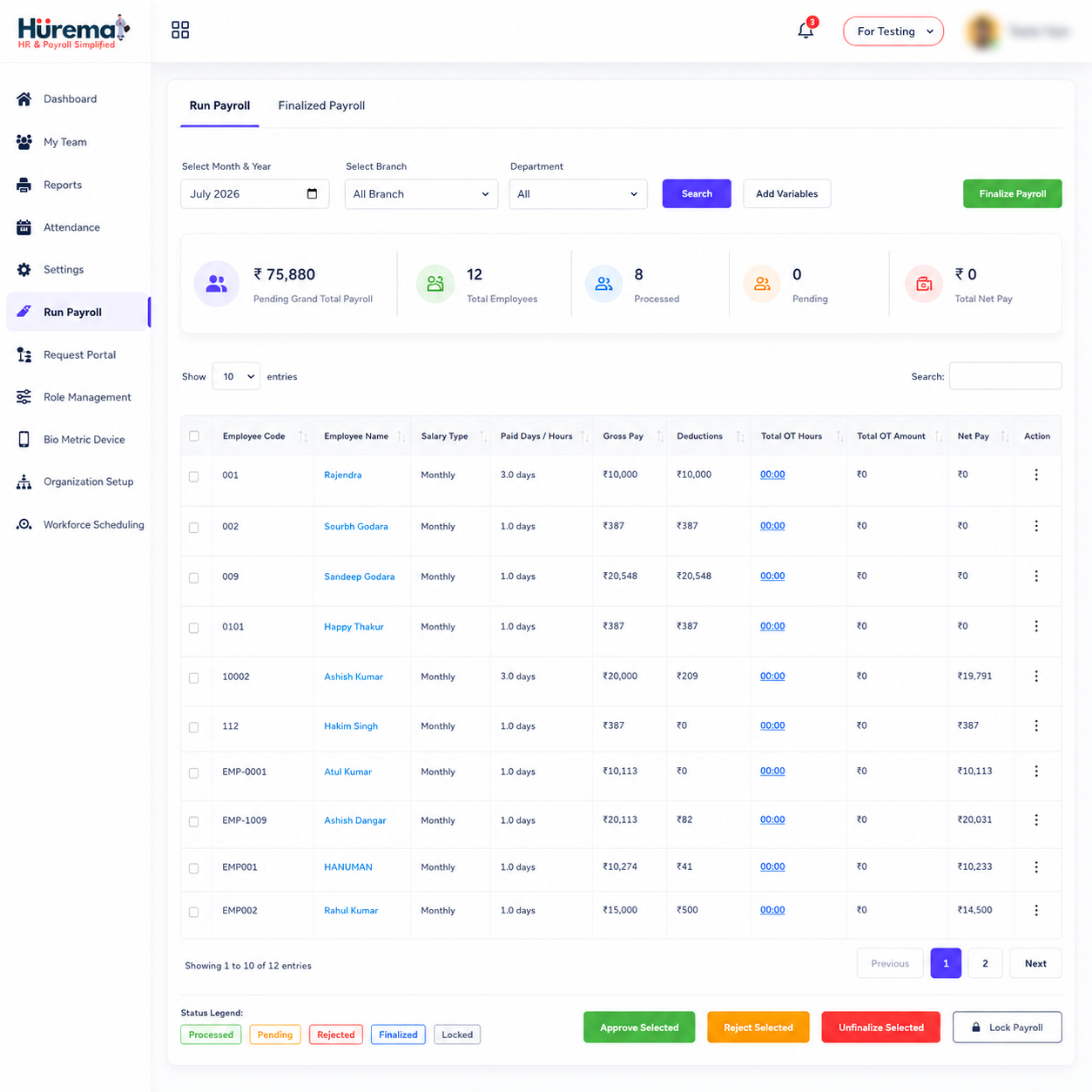
A payroll run commonly works from gross earnings and then applies applicable adjustments and deductions to calculate net pay. The underlying data can include salary components, approved attendance or leave inputs, bonuses or other additions, and configured deductions. Changes to compensation or employee status should be authorised and recorded before they are used in a cycle.
Hurema's feature information describes automated salary calculations using configured pay structures and inputs such as attendance, leave and deductions. A platform can reduce repeated arithmetic and re-entry, but the payroll owner should still compare a run with approved source records, investigate unexpected differences and confirm the final amount.
How attendance and payroll connect
Attendance matters to payroll when the employee's pay arrangement or organisation policy uses working-time information. For example, time records may help a team review days worked, attendance adjustments or an approved variable input. A monthly salaried employee's payroll treatment may differ from hourly or daily-paid work, so the system must follow the actual policy rather than apply a universal rule.
Collecting attendance in the HRMS can help payroll staff work from a consistent record. Hurema describes integrations with supported biometric, RFID and face-recognition attendance devices; punches can be reviewed in attendance tracking and connected to payroll workflows. Device compatibility and configuration should be checked for each workplace. Learn more about attendance tracking and Hurema attendance devices.
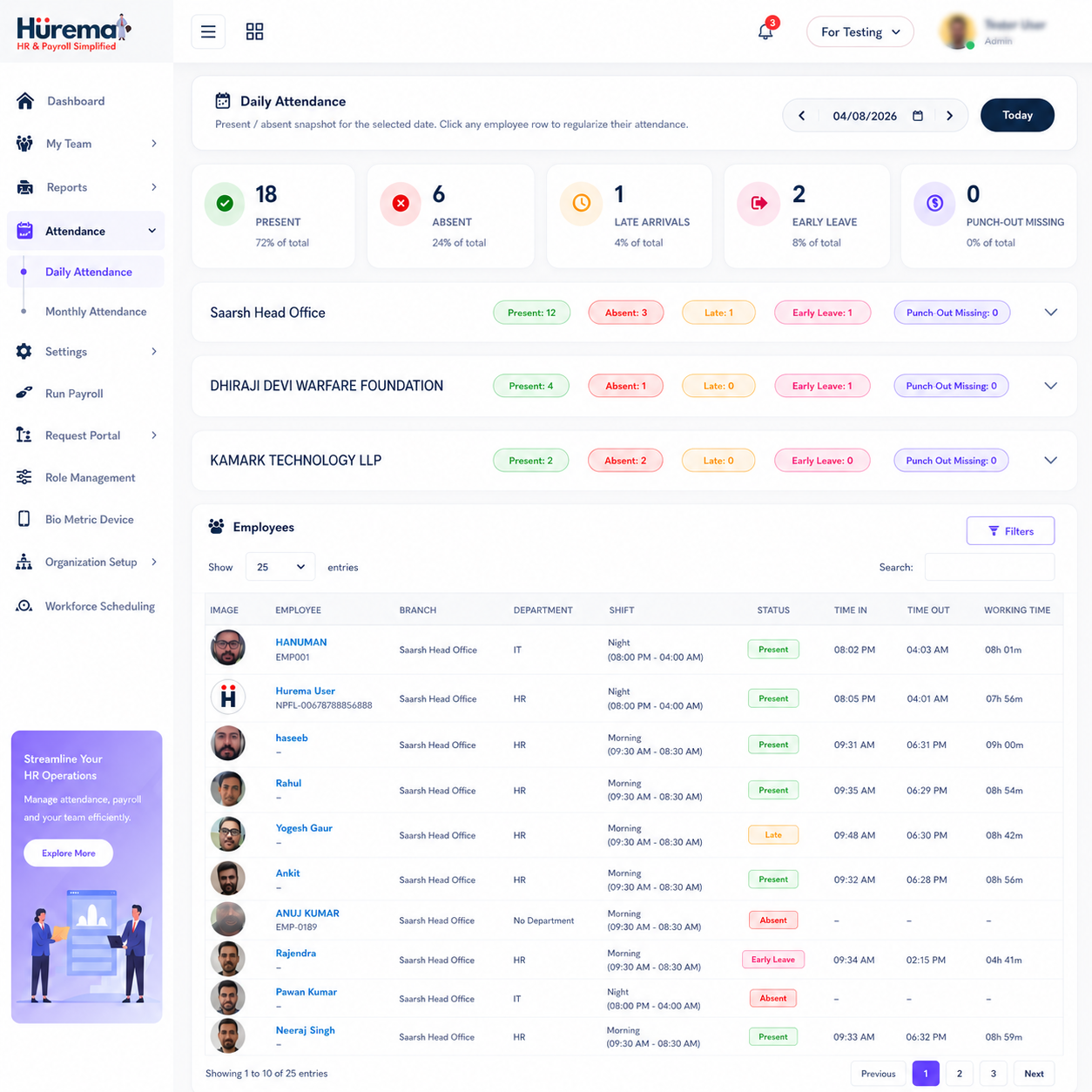
Before a pay run, review missing punches, correction requests and unusual time records. A device record is an input, not an explanation by itself. Managers should apply the organisation's correction and approval process so an employee's pay is based on reviewed information.
Leave and salary calculation
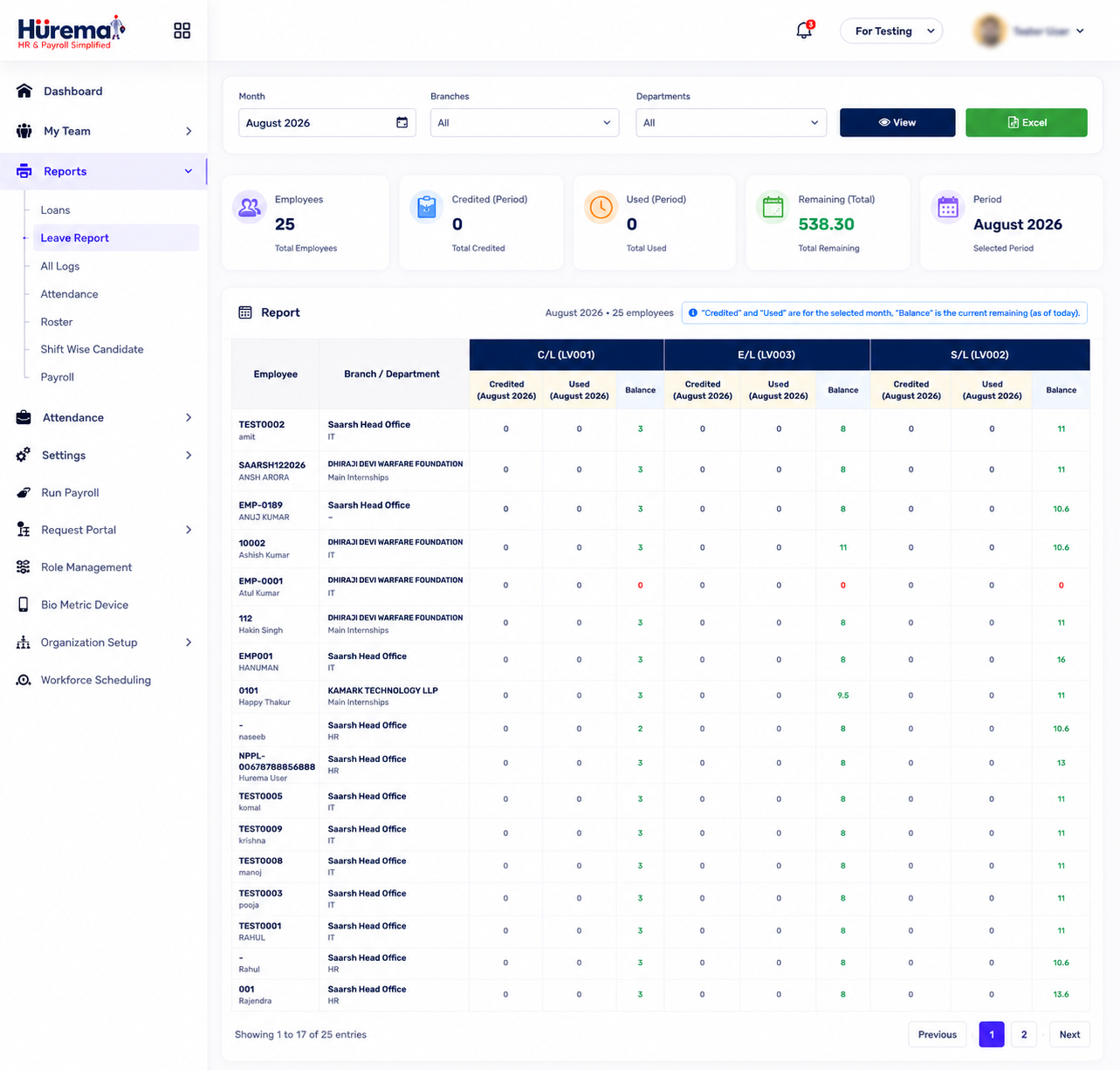
Leave administration and payroll intersect because approved absences can be relevant to balances, paid or unpaid leave treatment and the information used in a salary cycle. The exact treatment depends on the organisation's policy, employee terms and applicable rules. HRMS software can help by recording requests, decisions and balances in one place and showing approved information to payroll staff.
In Hurema, employees can submit leave requests, managers can review them, and balances update through the workflow; the website describes approved leave information as connected to payroll. Configure leave types and rules carefully, then confirm that the status and dates are correct before payroll is finalised. Do not infer salary treatment from the label of a leave category—use the approved policy and seek qualified advice if needed.
Deductions, payslips and employee clarity
Deductions reduce gross earnings to arrive at net pay. Which deductions apply, how they are calculated and when they must be deposited depend on the employee, compensation and current requirements. Examples may include statutory deductions where applicable and other authorised adjustments. Payroll teams should keep a record of the basis for each deduction and ensure that configured rules are current.
A payslip is a written summary of an employee's pay for a period. It commonly presents earnings, deductions and take-home pay in a format employees can understand. Clear payslips help employees check the result and raise a question through the right channel. Hurema's payroll module includes payslip generation, and its employee self-service information describes employees being able to download payslips through the mobile app.
Payroll compliance: use current, authoritative information
Payroll compliance is not a single setting in software. Employers must identify which obligations apply to their organisation and employees, maintain correct records, calculate contributions or withholding where required and complete relevant filings and payments on time. Applicability can depend on factors such as establishment, location, salary, employee status and changes in law.
Hurema describes payroll support for statutory workflows and deductions such as PF, ESI, Professional Tax and TDS, with reports for filing or professional review. Treat these capabilities as workflow support, not a promise that a product automatically determines every obligation or guarantees compliance. Have payroll rules and reports reviewed by a qualified professional and consult the relevant official authorities, including the Employees' Provident Fund Organisation and the Income Tax Department.
Payroll automation and software benefits
Payroll automation uses configured software to process repeated steps: gathering employee details, applying pay rules, calculating amounts, preparing payslips and keeping a run history. When attendance or leave connects to the HRMS, teams can avoid manually copying some information between systems. Automation can also make it easier to identify missing information before an authorised person reviews the cycle.
Benefits of payroll software may include:
- Less repeated data entry between employee administration and payroll preparation.
- A consistent place to review attendance, leave and compensation details.
- Repeatable calculations based on documented, configured pay rules.
- Structured approval and exception-review steps before payment.
- Faster preparation and distribution of payslips.
- Better visibility into changes and records associated with a payroll cycle.
These benefits depend on clean source records, sound configuration and review. Payroll management software is a tool to support a controlled process, not a substitute for one.
Manual payroll vs automated payroll
With manual payroll, a person gathers information from spreadsheets, attendance registers, email approvals and separate employee files, then calculates and checks each value. A small, stable team may be able to do this, but the process can become fragile when data is duplicated, pay arrangements vary or one administrator holds all the context.
Automated payroll uses a system to centralise data and apply configured steps. It can reduce calculation repetition and create a more consistent audit trail, but software still depends on accurate employee records, approved policy and up-to-date rules. A sensible migration runs test calculations alongside the existing process, compares results and resolves differences before teams rely on the new system. The goal is not to remove human oversight; it is to make that oversight more focused.
Why connect HRMS and payroll?
HRMS payroll places pay processing within the wider employee lifecycle. A central profile can hold compensation history and employment information; attendance and leave workflows can provide relevant inputs; payroll can produce a pay result and payslip. This reduces the number of disconnected hand-offs and gives HR and payroll teams a common record to review.
Hurema combines payroll with employee records, attendance, leave and employee self-service, and supports compatible attendance hardware. Teams can review whether that connected model matches their current process. Compare the HRMS Payroll product guide and the HRMS services selection guide.
Choosing payroll software in India
When evaluating payroll software in India, start with the organisation's actual pay arrangements and approval responsibilities. Ask the provider to demonstrate how an employee record is updated, how attendance and approved leave are reviewed, how deductions are configured and how the final payslip is produced. Check if reports and exports suit your payroll review and filing process.
- Map salary types and pay-cycle steps before configuring the system.
- Confirm supported attendance devices and leave workflows.
- Check role-based access to salary and employee data.
- Ask how policy changes and corrections are recorded.
- Confirm mobile access and employee payslip delivery options.
- Validate statutory calculations and filing steps with your qualified adviser.
For an India-wide HRMS comparison, see Best HRMS in India. Businesses in the region can review the Delhi NCR HRMS guide, and teams searching locally can use the Best HRMS Near Me checklist.
Match attendance hardware to the workplace
Attendance devices should fit the site's access, shift and payroll processes. A biometric attendance machine with payroll software can pass approved time records into salary preparation when the hardware and HRMS are compatible. For offices, compare a cloud-based office attendance system and its price with a face recognition time tracking terminal; in India, check which models work with your HRMS. Multi-site teams may also need centralized biometric devices for branches and a corporate office shift management system.
For industrial sites, compare an industrial biometric attendance machine or factory worker shift tracking device with the working conditions and shift patterns. Ask whether a heavy duty punch card machine for labor suits the process, how a contractual labor payroll management system handles approved hours, and whether an overtime calculator is available with the attendance machine. Confirm certifications and environmental ratings, including any IP65 waterproof rating, with the device manufacturer.
Education providers can assess a school student attendance biometric machine, an RFID card school attendance system with SMS alert, an automated student punch-in device or a college staff time tracking machine. Confirm student privacy and messaging requirements, and compare coaching institute biometric attendance prices based on the specific equipment and service scope.
Retailers may need a retail store staff attendance machine, supermarket multi-shift time tracking device or biometric machine for shopping mall employees; a small shop fingerprint attendance device may suit another setup. Healthcare teams can assess hospital staff shift management with biometrics, contactless face recognition for doctors, 24/7 rotational shift attendance and nursing staff payroll integrated with biometric records. Hospitality and food-service teams can compare a hotel staff time attendance system, restaurant kitchen employee biometric device or cafe staff attendance and salary software. Ask suppliers whether battery backup, AI face recognition and a mobile app integrated biometric machine are supported by the specific model.
Payroll management FAQs
What is payroll in simple terms?
Payroll is the process of calculating and paying employee compensation for a pay period, recording applicable adjustments and providing pay information such as a payslip.
How is an employee's salary calculated?
Salary calculation follows the agreed compensation structure and the organisation's rules, using relevant approved inputs such as attendance, leave, additions and deductions. Review the final result before payment.
Does attendance affect payroll?
Attendance may be a payroll input depending on the employee's pay arrangement and company policy. Hurema connects attendance workflows with payroll and supports compatible device integrations.
What is included in a payslip?
A payslip typically summarises earnings, applicable deductions and take-home pay for a period. The exact format and statutory disclosures depend on the employer's requirements.
Can payroll software guarantee compliance?
No software can guarantee that an organisation meets every legal obligation. Payroll teams must verify applicable rules, employee classifications, calculations and filing duties with qualified advisers and official sources.
What is HRMS payroll?
HRMS payroll is payroll processing within or connected to a human resource management system, so employee records and relevant attendance or leave workflows can support payroll preparation.
Can organisations benefit from payroll software?
Payroll software can help teams organise recurring calculations, inputs and payslips when manual processes become difficult to manage. Choose a solution that matches the organisation's pay structures and review process.
How can a business move from manual payroll to software?
First review current employee and salary records, document pay rules, validate opening balances, test a sample pay cycle and have an authorised person review results before relying on the new process.
See HRMS payroll in context
Explore how payroll, employee records, attendance and leave workflows fit together in Hurema, then ask the team about your organisation's process.
Explore HRMS Payroll Talk to Hurema